An AnyDesk scam starts with a phone call, text, email or pop-up that pushes you to install a remote access app, then uses it to drain your bank account or steal your data. AnyDesk itself is a legitimate program, but fraudsters misuse it because it lets them see and control your screen the moment you hand over your connection details.
In this guide from Advanzatech, you will learn how these scams work, the most common versions, the warning signs, what to do if you already gave access, and how to protect yourself and your business.
What Is an AnyDesk Scam?
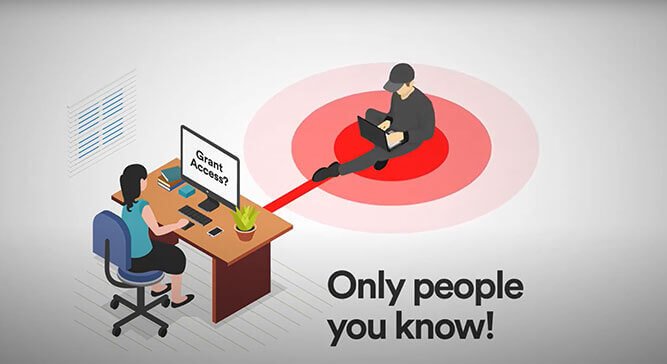
An AnyDesk scam is a type of remote access fraud. The criminal convinces you to install AnyDesk (or a similar tool) and share your AnyDesk address, then accept their connection request. From that point they can move your mouse, open your files, watch your banking screen and install other software.
The software is not the weakness. AnyDesk encrypts its connections, but encryption cannot protect you when you invite the attacker in yourself. The scam works through trust and pressure, not through hacking.
This is a global problem. In early 2023, US cybersecurity agencies (CISA, the NSA and MS-ISAC) issued a joint advisory about a refund-scam campaign in which criminals used legitimate remote tools, including AnyDesk and ScreenConnect, and some US federal employees were among the victims. Banks in India have also issued public warnings about AnyDesk fraud, so the tactic is well known to regulators.
AnyDesk’s own guidance says the same thing in two rules: never give strangers access to your devices, and never let someone rush you into it. See the company’s guide to avoiding remote access scams.
Common Types of AnyDesk Scams
The story changes, but the goal is always the same: get remote control, then money or data.
- Fake tech support: A pop-up or caller says your computer is infected or hacked and offers to “fix” it remotely, often claiming to be from Microsoft or Apple.
- Refund scams: You are told you were overcharged or are owed a refund and are asked to install AnyDesk to process it. The scammer then edits what your online banking page shows so it looks like you were refunded too much, and tells you to send the “extra” money back. This exact method appears in the CISA advisory.
- Bank or card fraud alerts: A text or call claims your account is compromised and asks you to install AnyDesk so they can “protect” your funds.
- Fake job offers: A recruiter asks you to install AnyDesk for onboarding or “equipment setup”. Real remote jobs exist, which is why this one works.
- Investment and crypto scams: A “broker” or “advisor” uses AnyDesk to guide you through trades while watching your wallet and passwords.
- Fake security audits: Ukraine’s CERT-UA warned about attackers posing as officials and sending AnyDesk requests for a supposed security check. Businesses should treat unexpected audit requests the same way.
- Fake delivery or online-shop issues: An order problem or return is used as the excuse to get you to open AnyDesk.
- Fake AnyDesk download sites: Look-alike sites push modified installers that can contain malware. Download only from the official site, anydesk.com.
How a Typical AnyDesk Scam Unfolds
Knowing the script makes it easier to interrupt. Most cases follow these steps:
- The hook. You get a call, SMS, email or alarming pop-up about a virus, a refund, a bank problem or a job.
- The pressure. The caller sounds official, creates urgency and warns of losses if you wait.
- The download. You are sent to install AnyDesk, sometimes from a fake link.
- The code. You are asked to read out your AnyDesk address and click Accept.
- The takeover. The scammer controls your screen, often asking you to open your bank app or log in to accounts “to check something”.
- The theft. Money is moved, a fake refund trick is staged, or passwords and cards are copied.
- The cover-up. They may leave remote access enabled or install extra tools so they can return later.
Warning Signs of an AnyDesk Scam
Stop immediately if you notice any of these:
- Someone you did not contact asks you to install AnyDesk.
- The caller claims to be from a bank, Microsoft, a courier or a government agency and wants remote access. Genuine companies do not cold-call and ask to control your computer.
- You are told to act fast, keep the call secret or stay on the line while you install software.
- You are asked to read out your AnyDesk address or approve a connection you did not start.
- The download link comes from a message or email, not from anydesk.com.
- They ask you to open online banking while they are connected.
- They ask for gift cards, crypto, bank transfers or a “refund” of extra money.
- A recruiter or broker insists AnyDesk is mandatory before any proper interview or contract.
What to Do If You Gave a Scammer AnyDesk Access
Act quickly and in this order:
- Disconnect. Click Disconnect in AnyDesk, then switch off Wi-Fi or unplug the network cable so the session cannot continue.
- Stop talking to them. Hang up and do not call back any number they gave you. Do not send money or buy gift cards.
- Call your bank from another device. Use the number printed on your card or on the official website, not one from the caller. Ask them to block cards, freeze transfers and review recent activity.
- Change your passwords from a different, trusted device. Start with email and banking, and any account where you reuse the same password. Turn on two-factor authentication.
- Have the computer checked. Uninstalling AnyDesk alone may not be enough, because the scammer may have installed other tools. Ask an IT professional to scan and clean the machine, or reinstall the operating system if the risk is high.
- Tell your employer. If the device is used for work, inform your IT team right away, since the attacker may reach company systems.
- Report it. See the reporting section below for where to report in your country and to AnyDesk.
If you lost money, move fast: banks have the best chance of stopping a transfer in the first hours.
How to Protect Yourself From AnyDesk Scams
A few habits stop almost all of these attacks:
- Never share your AnyDesk address with someone who contacted you first. Treat any unexpected request as hostile.
- If you need help, you make the call. Contact the company using the number on its official website.
- Download only from anydesk.com and check the URL carefully before installing.
- Review permissions in AnyDesk’s security settings. Turn off what you do not need, such as file transfer, remote restart and clipboard access, so even an accepted session is limited.
- Do not enable unattended access unless you need it, and protect it with a strong, unique password.
- Enable two-factor authentication on your AnyDesk account and on your banking and email.
- Never open banking apps during a remote session that someone else started.
- Uninstall AnyDesk if you no longer use it. A program you do not use is one more thing that can be abused.
- Keep your system and antivirus updated. Read AnyDesk’s own advice in its guide to avoiding remote access scams.
For businesses: Set a written policy that staff must verify any remote-support request by calling back on a known number, allow only approved remote tools, and restrict who can install software. Train employees on refund and fake-audit scams, because they target workplaces too. Advanzatech is an official distributor of AnyDesk in the Middle East and offers cybersecurity services, including multi-factor authentication with SecurEnvoy and endpoint protection with ThreatDown, to help lock down remote access.
How to Report an AnyDesk Scam
Reporting helps you recover and helps stop the scammer from reaching others.
- Your bank: Report immediately and ask for a freeze or investigation.
- Police or cybercrime authority: Report to your national cybercrime unit or local police. In the UAE, use the Ministry of Interior’s eCrime platform through the MoI UAE app (see the official UAE guide) or Dubai Police’s eCrime portal. In the US, file at ReportFraud.ftc.gov and ic3.gov.
- Mobile operator: Report the scammer’s phone number to your provider so it can be blocked.
- AnyDesk: Report the incident to AnyDesk Abuse Management. The company says it works with law enforcement and bans users who violate its terms.
- Platforms: Report the email, SMS, WhatsApp number or social media account that contacted you.
Keep evidence: Save phone numbers, messages, screenshots, transaction records and the scammer’s AnyDesk address if you can see it. Reporting rules differ by country, so check your local authority’s official website for the right channel.
Frequently Asked Questions About AnyDesk Scams
Is AnyDesk a scam?
No. AnyDesk is a legitimate remote desktop program from a German company, and Advanzatech distributes it in the Middle East. Scammers misuse it, as they do with other remote access tools, by tricking people into giving them access.
Can someone hack me through AnyDesk without my permission?
Not easily. Someone needs your AnyDesk address and either your approval of the session or the password you set for unattended access. Most scams work by persuading you to give that permission.
What happens if I only downloaded AnyDesk but did not give a code?
The app by itself does not let anyone in. Without your address and your acceptance, the scammer cannot connect. Close and uninstall it, and do not continue with the caller.
What can a scammer do with AnyDesk access?
They can view your screen, open files, see saved passwords, use your online banking while you are logged in, and install other software. That is why you should disconnect and secure your accounts at once.
Conclusion
An AnyDesk scam depends on one thing: getting you to let a stranger in. If you never share your AnyDesk address with someone who contacted you first, and you verify every support request through official channels, you cut off almost every version of this fraud.
If you or your team have already been targeted, act fast: disconnect, call your bank, change passwords from a safe device and report it.
Need help securing your devices or setting up safe remote access for your business? Contact Advanzatech or book a demo and we will help you do it properly.
Want to learn more about the tool itself? Read our complete guide to AnyDesk remote desktop: features, pricing and safety. You can find more articles on the Advanzatech cybersecurity blog.